I just bought my first iPod and I’m so excited, but Windows doesn’t open my iPod properly and I can’t figure out how to download songs onto my iPod. How do you download songs onto an iPod?”
Before you can begin downloading songs onto your iPod you need to download a little program called iTunes for Windows. You need iTunes to do anything on your iPod including transferring songs and videos from your computer to the iPod. Itunes will manage and organize all your media files, and you can purchase more music, videos, tv shows, games and apps (iPod touch).
So before we can download songs onto the iPod we need to install the mighty iTunes from Apple.
Select your operating system and download the latest version of iTunes from Apple.
Accept the license term and click “Next” to proceed with the install.
Installation Options – this option will let you decide where you want to install iTunes. Check or un-check options as you see fit.
Now click “Install” to begin the installation.
Once you get all that done and out of the way you can plug your iPod with the supplied USB cable and iTunes should open automatically if it doesn’t then manually launch iTunes. You should now see your iPod on the left hand side. Click on it to and begin to edit your syncing options in each tab. Go through each tab carefully cause there is a lot of different syncing options.
Hope this points you in the right direction on how to download songs onto your iPod.
If you need more help check out Apple’s Support page.
Click on the iTunes.exe file to began the install. You will get a nice Welcome window basically saying iTunes is the best way to import your music, videos and all your media and the installer guide will take you through the steps. Click Next to begin.
Monday, August 24, 2009

How to Update iPhone Firmware
“How do you update the firmware on the iPhone?”
Apple has recently updated the iPhone and iPod touch firmware to 3.0.
What’s new in iPhone/iPod touch 3.0 software?
Cut, Copy & Paste
Landscape Keyboard
MMS
Spotlight Search
Improved Calendar
Buy Movies, TV Shows, and Audiobooks
Enhanced Stocks App
Voice Memos (iphone mic or headset)
Here’s how to update your iPhone or iPod touch to the latest firmware.
1. Make sure you got the latest iTunes installed, iTunes 8.2 is needed for the 3.0 update.
2. With iTunes launched and your iPhone plugged in click on your iPhone under “Devices”
3. In the window pane to right hand side click on “Check for Update”.
*iPod touch users: When you update your iPod touch you will be sent to the store to purchase the newer firmware for $9.99. Follow the steps to purchase the firmware.
4. Now just click “Download and Install”. It’s very important that you do not unplug the iPhone or iPod touch during the firmware update.
Go here for more details on the latest features and how to update the iPhone firmware http://www.apple.com/iphone/softwareupdate/
Apple has recently updated the iPhone and iPod touch firmware to 3.0.
What’s new in iPhone/iPod touch 3.0 software?
Cut, Copy & Paste
Landscape Keyboard
MMS
Spotlight Search
Improved Calendar
Buy Movies, TV Shows, and Audiobooks
Enhanced Stocks App
Voice Memos (iphone mic or headset)
Here’s how to update your iPhone or iPod touch to the latest firmware.
1. Make sure you got the latest iTunes installed, iTunes 8.2 is needed for the 3.0 update.
2. With iTunes launched and your iPhone plugged in click on your iPhone under “Devices”
3. In the window pane to right hand side click on “Check for Update”.
*iPod touch users: When you update your iPod touch you will be sent to the store to purchase the newer firmware for $9.99. Follow the steps to purchase the firmware.
4. Now just click “Download and Install”. It’s very important that you do not unplug the iPhone or iPod touch during the firmware update.
Go here for more details on the latest features and how to update the iPhone firmware http://www.apple.com/iphone/softwareupdate/
How to Delete Gmail Account
I want to delete a Gmail account for good, is there a way that I can permanently close my account?”
If you want to just cancel your Gmail account but still keep using other Google services here’s how to delete your Gmail account. Just keep in mind that all your mail will be lost and you will not get it back once you close your Gmail account.
First log into your Gmail Account.
Select Google Account settings.
Hit the “Edit” button next to “My products” on the right side.
Select “Delete Gmail Service”
If you want to close your Google account entirely go here.
Source
If you want to just cancel your Gmail account but still keep using other Google services here’s how to delete your Gmail account. Just keep in mind that all your mail will be lost and you will not get it back once you close your Gmail account.
First log into your Gmail Account.
Select Google Account settings.
Hit the “Edit” button next to “My products” on the right side.
Select “Delete Gmail Service”
If you want to close your Google account entirely go here.
Source
Inserting Images in Gmail
One of the most annoying things I find in emails are “Attachments” especially attachments of an image or images. Not only is it annoying but it can also be dangerous, one of the first rules in keeping your computer virus free is not to download attachments. Now Gmail allows you to insert images into your email messages without attachments. Yay!
First thing you need to do is log into your Gmail account. Once you’re logged in go to the upper right hand side and click “Settings”.

Now we are in the Settings Menu, there are many different tabs here, click on "Labs".

From the Labs tab scroll down until you see the box “Inserting images” by Kent T. Click “Enable” to turn this feature on.

Now click “Save” to save it of coarse.
Now to add an image to the body of your email click on the little “Image” icon on the top menu.

When you click on that image icon you can then upload a image from your computer or the web address of the image. When the image is uploaded click “Add Image”. You can then choose the size from small, medium or large or keep it in the original size.

Source
First thing you need to do is log into your Gmail account. Once you’re logged in go to the upper right hand side and click “Settings”.

Now we are in the Settings Menu, there are many different tabs here, click on "Labs".

From the Labs tab scroll down until you see the box “Inserting images” by Kent T. Click “Enable” to turn this feature on.

Now click “Save” to save it of coarse.
Now to add an image to the body of your email click on the little “Image” icon on the top menu.

When you click on that image icon you can then upload a image from your computer or the web address of the image. When the image is uploaded click “Add Image”. You can then choose the size from small, medium or large or keep it in the original size.

Source
Outlook won’t remember password
Why does Outlook forget my password on an email account and box pops up to confirm password.
Outlook can remember every password for different email accounts to save you the trouble of typing the password each time but we need to make sure we have the correct settings.
Store and Save Password for Outlook 2003:
On the top menu bar select “Tools” then “Email Accounts..”
Select “View or change existing e-mail accounts” and click “Next”
Choose the email account which will be highlighted
Select “Change”
Look under “Login Information” and be sure “Remember password” is checked off
Now key in the email password under “Password”
Click “Next” and “Finish”
How to save Email Password for Outlook:
Choose “Tools” and then “Account Settings” on the menu bar
Select the “Email” tab
Choose the email account you want to remember password
Select “Change”
Look under “Login Information” and be sure “Remember password” is checked off
Now type in the email password under “Password”
Click “Next” and “Finish”
If Outlook still does not save your email password then check out this Microsoft Support Help article for Outlook to get more troubleshooting tips.
Outlook can remember every password for different email accounts to save you the trouble of typing the password each time but we need to make sure we have the correct settings.
Store and Save Password for Outlook 2003:
On the top menu bar select “Tools” then “Email Accounts..”
Select “View or change existing e-mail accounts” and click “Next”
Choose the email account which will be highlighted
Select “Change”
Look under “Login Information” and be sure “Remember password” is checked off
Now key in the email password under “Password”
Click “Next” and “Finish”
How to save Email Password for Outlook:
Choose “Tools” and then “Account Settings” on the menu bar
Select the “Email” tab
Choose the email account you want to remember password
Select “Change”
Look under “Login Information” and be sure “Remember password” is checked off
Now type in the email password under “Password”
Click “Next” and “Finish”
If Outlook still does not save your email password then check out this Microsoft Support Help article for Outlook to get more troubleshooting tips.
How to delete hotmail account
If you want to close your Hotmail account just stop using it. This is the way Microsoft actually recommends for deleting Hotmail accounts. Here is how the process works, if you do not touch your hotmail account for thirty days the account becomes inactive, and after ninety days Passport becomes inactive. But there is a way to delete Hotmail account manually. Follow the instructions below.
Click on “Help” on a Hotmail page it doesn’t really matter which page
In the search area type in “Close Account”
Select the “Close your Hotmail Account” in the help screen
Select the “Close Account” link which is highlighted in blue
Click “Close Account” to finish closing the hotmail account
Click on “Help” on a Hotmail page it doesn’t really matter which page
In the search area type in “Close Account”
Select the “Close your Hotmail Account” in the help screen
Select the “Close Account” link which is highlighted in blue
Click “Close Account” to finish closing the hotmail account
Change Gmail theme
“I was walking by a co-workers desk when I noticed he had Gmail open but it wasn’t like the usual Gmail look. He had something entirely different that made his Gmail account look really unique. How do you change the Gmail theme, is there a plug in i need to download?”
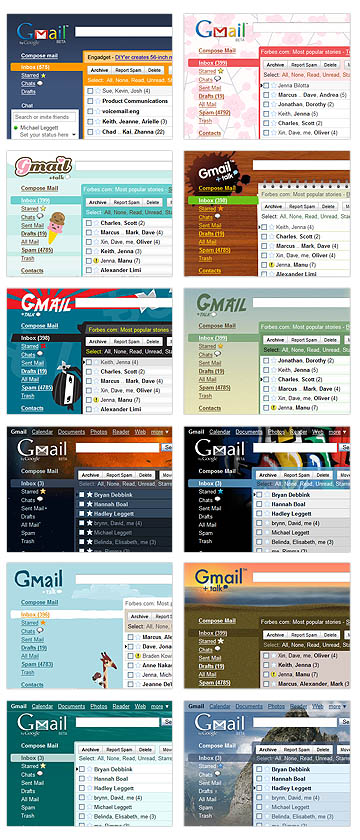
Google added different “Themes” in Gmail recently so everything you need to change your default Gmail theme is in your settings.
How to change Gmail theme:
Log into your Gmail account.
At the very top on the right hand side click on “Settings”
Now you should be in Settings with a number of different tabs, look all the way to the right and you will see the “Themes” tab. Click on it. Now you will see a number of different themes to choose from, click on any of the themes and Gmail will automatically change it to the one you selected.

Google added different “Themes” in Gmail recently so everything you need to change your default Gmail theme is in your settings.
How to change Gmail theme:
Log into your Gmail account.
At the very top on the right hand side click on “Settings”
Now you should be in Settings with a number of different tabs, look all the way to the right and you will see the “Themes” tab. Click on it. Now you will see a number of different themes to choose from, click on any of the themes and Gmail will automatically change it to the one you selected.
Subscribe to:
Posts (Atom)

 Posts
Posts


